I am very excited over Scrap Girls new product line, Pocket Life! It lends itself perfectly to Art Journaling – Scrap Girls Style!
Most sizes can be printed, cut out and placed into your journal with little or no size manipulation. Even the 12×12 inch papers can be used directly in a larger journal (this would require a large format printer)!
In the February Pocket Life Special I found a 3×4 inch card that I know I will be printing out quite a few of to have on hand.
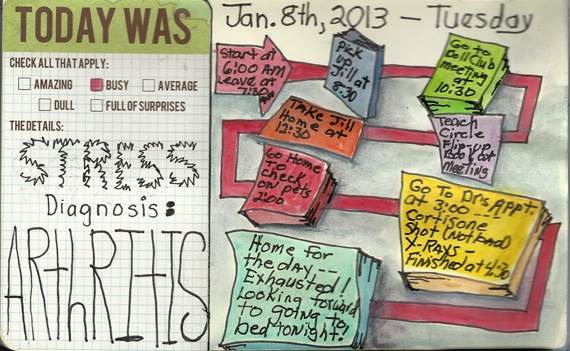
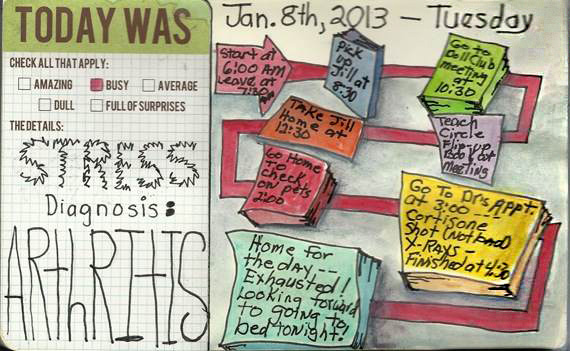
Last Tuesday, I had an unusually busy & stressful day that I wanted to record in my Art Journal. Here is how I did it, FAST & EASY with Scrap Girls February Pocket Life Special.
First, I opened PhotoShop and created a new file the size of my journal page.
Then, I opened the Pocket life card I wanted to use and brought it over to my document,; in this case, I only had to bring the bottom edge of the card down to the bottom of my journal page. (1)
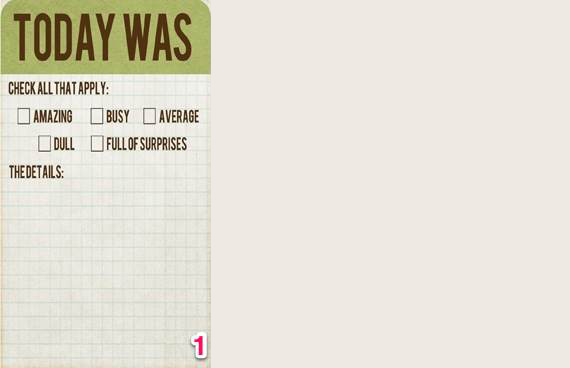
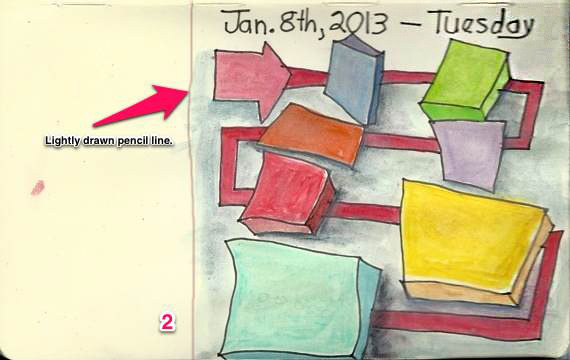
Print and cut out…Place it in your journal and draw a light pencil line at the edge.
Next, I wrote down on a piece of paper & counted how many things I wanted to record.
Now it’s time for what I call mapping. You can draw, stamp or glue and paste however many shapes that you have things you want to record. Place them in a manner that you can connect them with a line or lines. Sort of like a map!
I used a 2H pencil which has a hard lead and is light. That way I can design away until I’m satisfied; then I went over the lines with my Pitt pen and then erased all the pencil lines. I used water color pencils with a waterbrush to add the color; but almost any media would work, acrylics, pastels, even crayons!
Now all that is left to do is glue the Pocket Life card into your journal and finish the details. Easy Peasy!
Enjoy the possibilities with Pocket Life!
Tutorial written by Jerrie Hall
 To our Free Newsletter